|
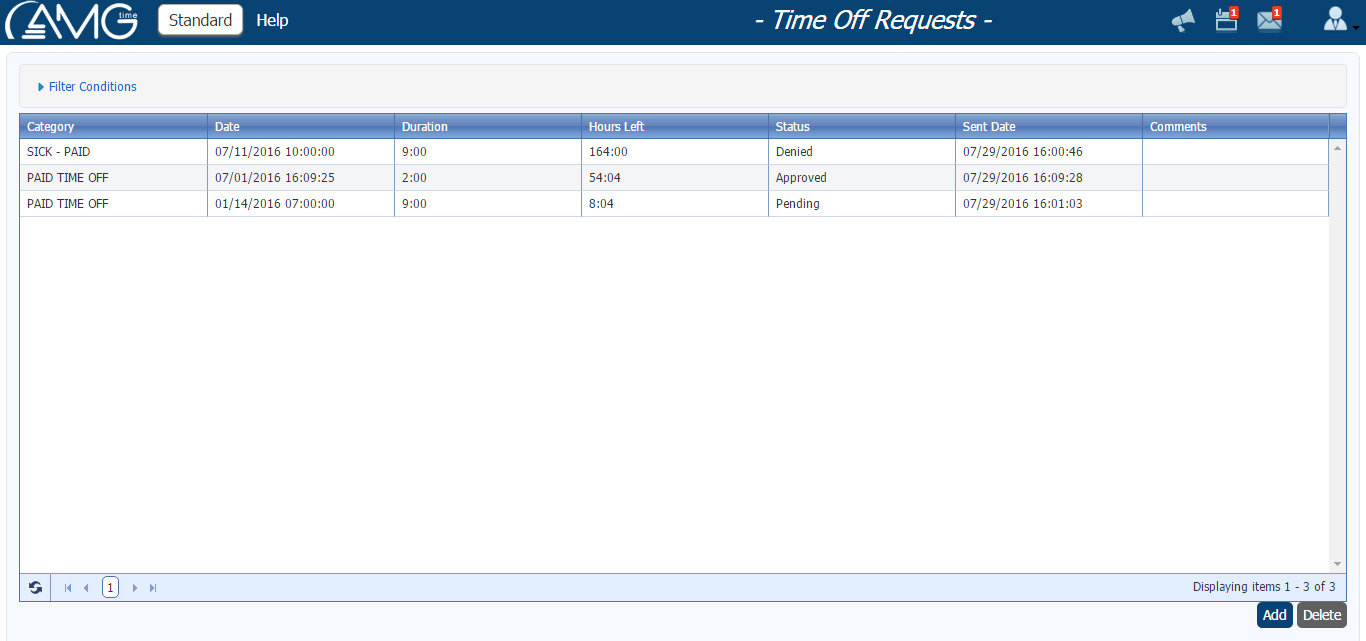
Time Off Requests page gives the employees an opportunity to send to users requests for time off. User who gets the request can either approve or deny it.
Requests can be for Holiday, Sick-Paid or Vacation categories. If user approves the request, then on the requested day and time is being added a miscellaneous transaction for the requested category and duration.
The main part of the page is the list of time off requests. The list can be sorted by any column both ascending and descening. To sort the list you should just click on the Column title. The list can also be filtered by some criteria. (Click here to see the description of filtering.)
To filter the list of time off requests you should do the following:
- Click on the Filter button ( As a result will appear Time Off Request Filter box.
- In Time Off Request Filter box enter or select the criteria by which you want to filter.
- Click on the Filter button.
As a result of filtering in the list of time off requests will be displayed only those requests which correspond to the entered or selected criteria. If no time off request corresponds to criteria, then no record wil be displayed in the table. To view all the time off requests or to sart over filtering you should click on the Reset button.
To hide the Time Off Request Filter box, click again on the Filter button.
In this page you can either add a new request, delete pending requests or cancel already approved requests for upcoming days.
To add a request, you should do the following:
- Click on the Add button. As a result will open Request Time Off pop-up window.
- From the Category combo box select the category for which you are requesting time off.
- Select Full Day option if you want to request time off for the whole duration of the day, or select Partial Day option if you want to request time off for the part of the day.
- In the Start Date field enter the first day of the period for which you are requesting a time off.
- In the Number of Work Days field enter for how many days you are requesting a time off.
- In the Start Time field enter the time starting from which you are requesting a time off, if Partial Day option is selected.
- In the Hour and Minute fields enter for how many hours and minutes you are requesting a time off, if Partial Day option is selected.
- In the Comments field enter comments regarding the time off being requested. (This field will be available only if transaction comments are enabled from Settings.)
- In the Preview table view the summary of selected days and total duration of requested time off(s).
- Click on the OK button.
To delete a request, you should do the following:
- From the Time Off Requests table select the request that you want to delete.
- Click on the Delete button.

To cancel approved request, you should do the following:
- From the Time Off Requests table select the approved request that you want to cancel.
- Click on the Cancel button.
| Note: |
- For Approved and Denied requests Delete button will be disabled. Only pending requests can be deleted.
- Past time off requests cannot be canceled.
|
|