|
In the Attendance page you can find the timecard of the employee.
Attendance page contains one main table and some controls, which will be later described.
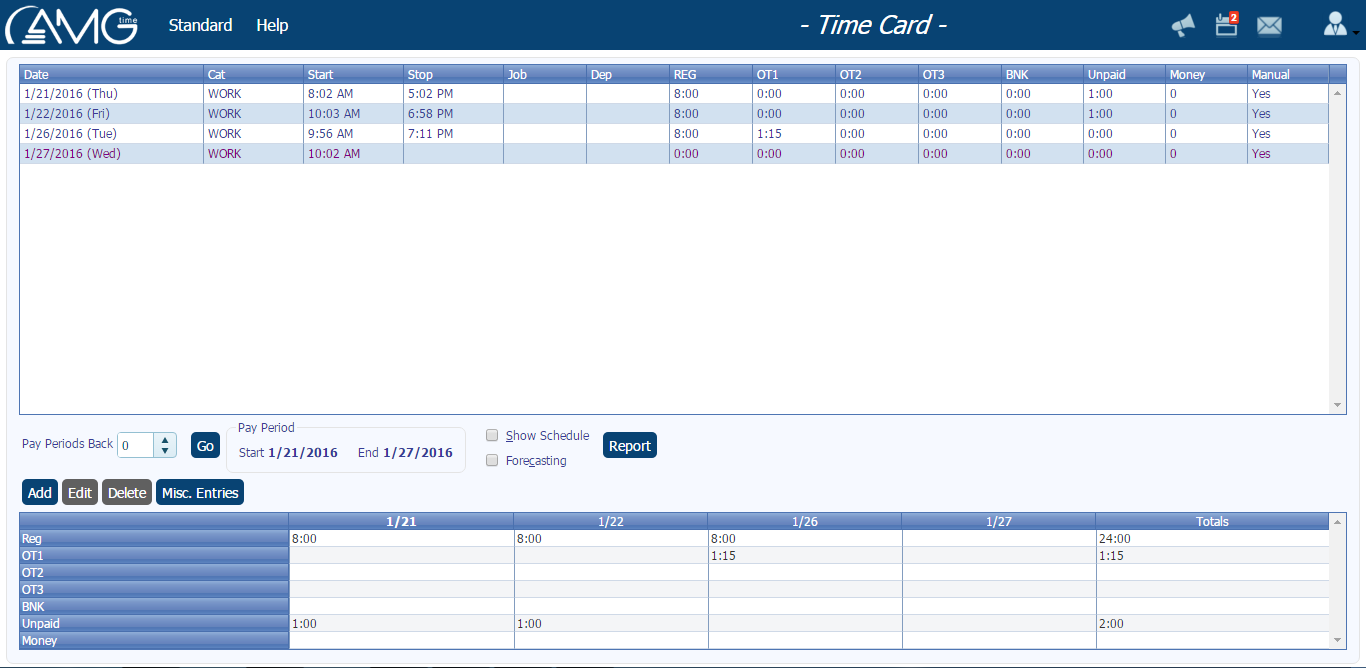
The table displays all the transactions performed by the employee who is logged in. By default are displayed the timecard of the current pay period, but you have a possibility to go back to the previous pay period and view previous timecard. Start and End dates of the pay period you can see in the Pay Period group box.
In the table is displayed the following information about each record: Date, Category, Start and Stop times, Job (if the employee was assigned to any job), hours accrued as Regular, OT1, OT2 (optional), or Unpaid.
In the table for a single day there can be more than one records. That means that on that day employee has punched in and out more than once. All the records of the same day have the same background color in order you could easily differentiate them from the ones of previous or next days. Besides, each record, depending on its status, can be of different predefined colors, each of which indicates a certain status (click here to see what the colors indicate in timecard).
| Red |
Indicates the days when the employee hasn't punched at all. |
| Blue |
Indicates the days when the employee has punched both in and out. |
| Dark Magenta |
Indicates the days when the employee has missing punches. |
In the second table of the Timecard is displayed the Total amount of hours worked as Regular, OT1, OT2 (optional) and Unpaid both for each day and for the whole Pay Period.
When viewing Timecard you are given also an opportunity to view employee's schedule and forecasts of his attendance for the upcoming days in current Pay Period. If you want to view the scheduled start and stop times of the employee you should select Show schedule combo box. To see also according to the assigned schedule at which days of the Pay Period and how many hours (both paid and unpaid) the employee should work, select also Forecasting check box.
|
